Touchscreen Keyboard Fails to Automatically Pop Up
On Mesa devices running Windows 11, tapping into a text field may fail to trigger the automated on-screen / virtual touch keyboard. This issue typically manifests after installing Windows updates.
Try standard Windows troubleshooting steps:
Change the touch keyboard settings to When no keyboard is connected or Always
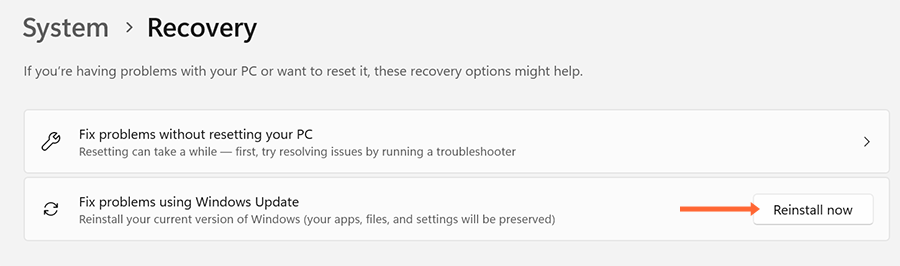
If the standard Windows troubleshooting steps fail to resolve the problem, use the Windows Update Repair feature. From Settings > System > Recovery.
Tap Reinstall now in the Fix problems using Windows Update panel.
Follow the on-screen prompts.
Note: The repair process typically takes 2–4 hours to complete.
Temporary Workarounds
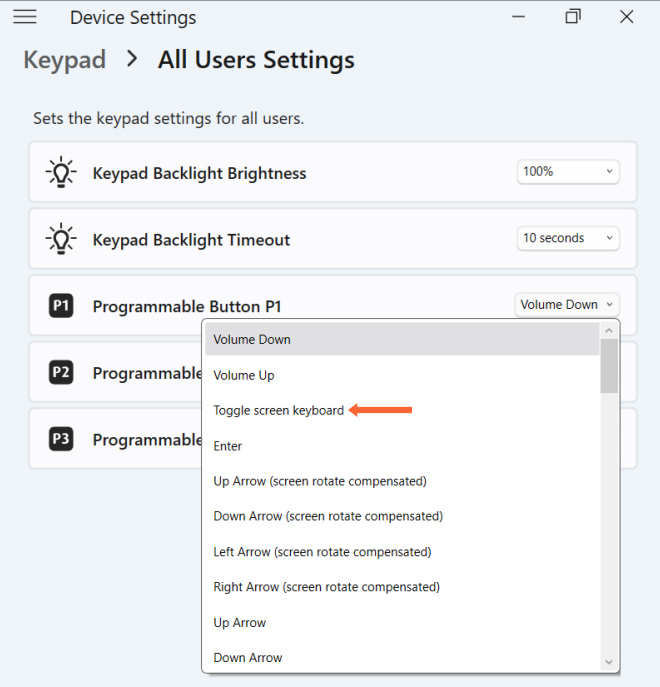
If an immediate solution is required while in the field, use the P3 key to open the keyboard. (Note: If you have reassigned P3, you may need to assign Toggle screen keyboard to one of the programmable keys.)